Table of Contents
Key Takeaways: Agentic Workflows for Businesses
1. Automation is moving beyond individual applications. The real value of AI agents lies in connecting existing business systems and executing tasks across them, rather than introducing another standalone AI tool that employees must manage.
2. Integration quality matters more than the AI model alone. APIs, MCP, and application connectors determine what an agent can actually access and execute. Poorly designed integrations can make even capable AI models unreliable in real business environments.
3. Not every workflow should be fully autonomous. Businesses should distinguish between tasks an agent can execute independently and decisions that require human approval. Financial actions, customer communication, and sensitive data changes need clearly defined permission boundaries.
4. Creative workflows are becoming part of business automation. AI agents can now contribute to production activities such as footage selection and initial video editing through tools like Invideo Editor. This makes agentic automation relevant beyond conventional CRM, reporting, and operational workflows.
5. Start with measurable workflows, not ambitious automation targets. At Cybertize Technologies, we believe businesses should first identify repetitive, multi-application processes where automation can reduce execution time or manual intervention. Prove reliability in one workflow before extending agent responsibilities across the organization.
Businesses rely on multiple software applications to manage daily operations, from customer relationships and project tracking to reporting and content production. While these tools help teams stay organized, completing tasks across different platforms often requires manual effort, repeated actions, and constant switching between applications.
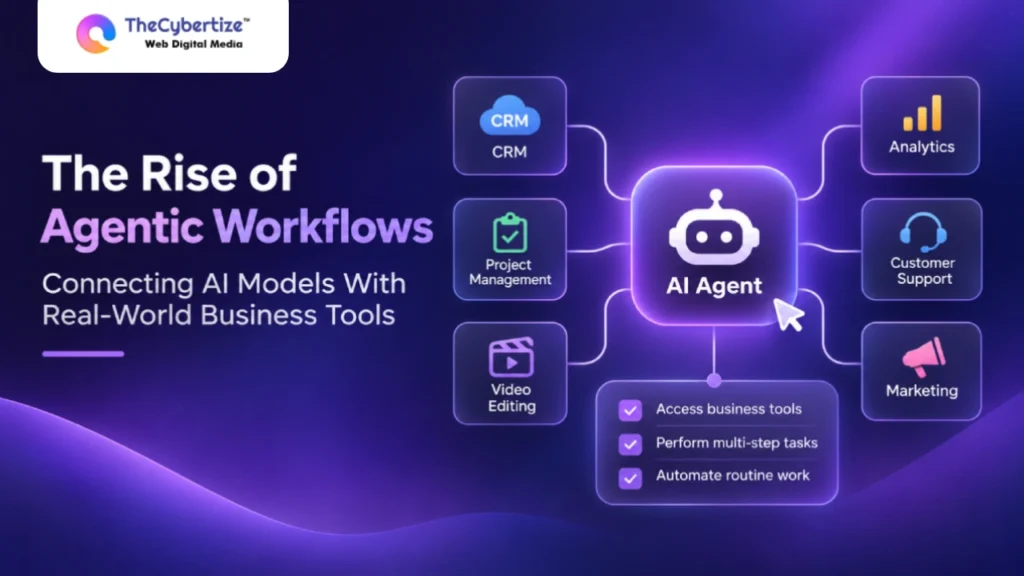
AI agents are beginning to change how these systems work together. Unlike traditional AI assistants that mainly provide answers or suggestions, AI agents can connect with business tools, access relevant information, and carry out supported actions based on user instructions.
This shift is driving the rise of agentic workflows, where AI models work with existing software to manage multi-step tasks. For businesses, it creates opportunities to reduce repetitive work, improve coordination between applications, and make everyday processes more efficient while keeping people involved in important decisions.
Understanding Agentic Workflows
An agentic workflow allows an AI system to work toward a defined goal by selecting tools, taking supported actions, and checking the results. Unlike a basic chatbot that only generates an answer, an AI agent can interact with business applications when authorized.
Consider a manager preparing a weekly customer report. A regular assistant might suggest a report structure. An authorized agent could retrieve CRM records, identify overdue follow-ups, and prepare a summary for approval.
Most agentic workflows involve four steps:
- Understand the goal: Identify the requested outcome and any restrictions.
- Select tools: Find the connected applications needed for the task.
- Perform actions: Retrieve information or make permitted changes.
- Review results: Check completed steps and request approval when necessary.
The level of independence depends on the workflow. Businesses can keep sensitive decisions under human control.
Why Businesses Are Connecting AI to Existing Software
Businesses increasingly depend on specialized applications. Sales teams manage customer records, operations teams track projects, and marketing departments review performance through separate dashboards.
Each application may work well individually, but moving information between them often requires manual effort.
A marketing manager preparing a campaign report might gather data from an analytics dashboard, check customer activity in a CRM, and update tasks in project management software.
Agentic workflows can connect these steps. Instead of repeatedly copying information between tools, an authorized agent can collect relevant details and prepare the next action.
The goal is not to automate every business decision. It is to reduce routine work while allowing employees to focus on communication, planning, and quality.
How Do AI Agents Connect With Business Applications?
AI agents interact with business software through APIs, approved connectors, and standards such as the Model Context Protocol (MCP).
APIs allow applications to exchange information and perform defined operations. MCP provides a common way for compatible AI applications to discover and access supported external tools.
An agent connected to a CRM might retrieve account information and create follow-up tasks. A reporting connection might allow data retrieval without providing permission to modify records.
These differences matter because an AI agent should only perform actions that the application and user have authorized.
Reliable connections also need clear tool descriptions, error handling, and permission checks. Without these controls, an agent may choose the wrong action or fail to complete a task.
Also Read | How MCP Connects AI Agents to Video Editing Workflows
Practical Applications of Agentic Workflows
Agentic workflows are particularly useful when tasks follow repeatable steps and involve information from several applications.
Sales and Customer Follow-Ups
An AI agent connected to a CRM can identify customers with overdue follow-ups, review recent account activity, and prepare task lists.
With suitable permissions, it may also create reminders for sales representatives.
Employees can then review the information before contacting customers.
Customer Support and Operations
Customer support teams frequently retrieve order details, review policies, and prepare responses.
An agent connected to approved systems can collect relevant information and help prepare answers.
When a request requires judgment or falls outside its permissions, the agent can pass the details to a human representative.
Marketing and Video Production
Creative production shows how agentic workflows extend beyond collecting information. AI agents can also perform supported actions inside applications where actual work takes place.
Consider a SaaS marketing team preparing a three-minute product demonstration from a longer recording. Instead of manually reviewing every take, the team could assign initial editing work to an AI agent.
With Invideo Editor, AI editing agents can review footage, select useful sections, and assemble an initial cut on an editable timeline. The marketing team can then check whether the product’s key features are explained clearly and adjust the footage manually.
This gives the team a starting point for its video while keeping creative decisions and final approval in human hands.
Reporting and Analytics
Business reporting often requires collecting information from different platforms.
An authorized agent can retrieve available data, organize the findings, and prepare a report.
Managers still need to verify calculations, reporting periods, and whether the information is complete.
Also Read | Mistakes That Won’t Let Google AI Overviews Cite Your Website (Cybertize’s Honest Take)
Benefits of Agentic Workflows for Businesses
Agentic workflows help businesses reduce repetitive tasks, connect information across applications, and manage daily operations more efficiently. By allowing AI agents to perform supported actions, teams can spend less time switching between tools and more time reviewing results and making important decisions.
These benefits depend on how well the workflow is designed. Clear instructions, reliable software connections, and human oversight are essential to avoid errors and unnecessary rework.
Building Reliable Agentic Workflows for Businesses
Successful agentic workflows depend on clear instructions, well-connected applications, and defined responsibilities. Businesses can improve results by giving AI agents specific tasks and setting clear expectations for each step.
Permission settings and approval processes help teams manage how agents interact with business applications. Activity records also provide visibility into completed tasks, making it easier to review progress and maintain consistency.
By starting with smaller workflows and gradually expanding their responsibilities, companies can introduce AI agents into daily operations while keeping employees involved in important decisions.
Also Read | MCP Gateway Architecture for Enterprises: Design Patterns, Components and Best Practices
How Can Businesses Introduce Agentic Workflows?
The best starting point is a repeatable task with a clear outcome.
A company might begin with weekly reporting, customer follow-up preparation, or an initial video editing task.
First, document what the agent should accomplish and which applications it needs. Next, define permissions and identify any actions requiring approval.
For creative teams, Invideo Editor provides a useful example of this approach. An editing agent can prepare a first cut, after which the team reviews the timeline, adjusts individual clips, and decides what needs further work.
This allows businesses to judge the agent’s contribution through actual results rather than treating automation as the final goal.
Once a workflow performs reliably, teams can introduce additional tasks gradually.
Conclusion
Agentic workflows are changing how AI interacts with business software. Instead of only providing suggestions, authorized AI agents can retrieve information, complete supported actions, and help teams manage connected processes.
Applications across sales, reporting, customer support, and creative production can benefit from this approach.
Successful adoption depends on clear instructions, reliable integrations, limited permissions, and human review. Businesses that begin with manageable tasks can learn where AI agents provide value without giving up control over important decisions.
Frequently Asked Questions
How are AI agents different from AI assistants?
AI assistants typically answer questions and generate content. AI agents can also access connected tools, perform permitted actions, and complete multi-step tasks. Their actual capabilities depend on the software and permissions available.
Do agentic workflows require MCP?
No. AI agents can connect through APIs and other approved integrations. MCP is one standard that helps compatible AI applications discover and work with external software tools.
Can AI agents help businesses edit videos?
Yes, when connected editing software supports those actions. Invideo Editor allows AI editing agents to work on an editable timeline, helping teams prepare rough cuts and refine footage while retaining manual editing control.
Are agentic workflows suitable for small businesses?
Yes. Small businesses can begin with low-risk tasks such as preparing reports, organizing customer information, or creating routine updates. Clear permissions and human review help reduce errors as workflows expand.