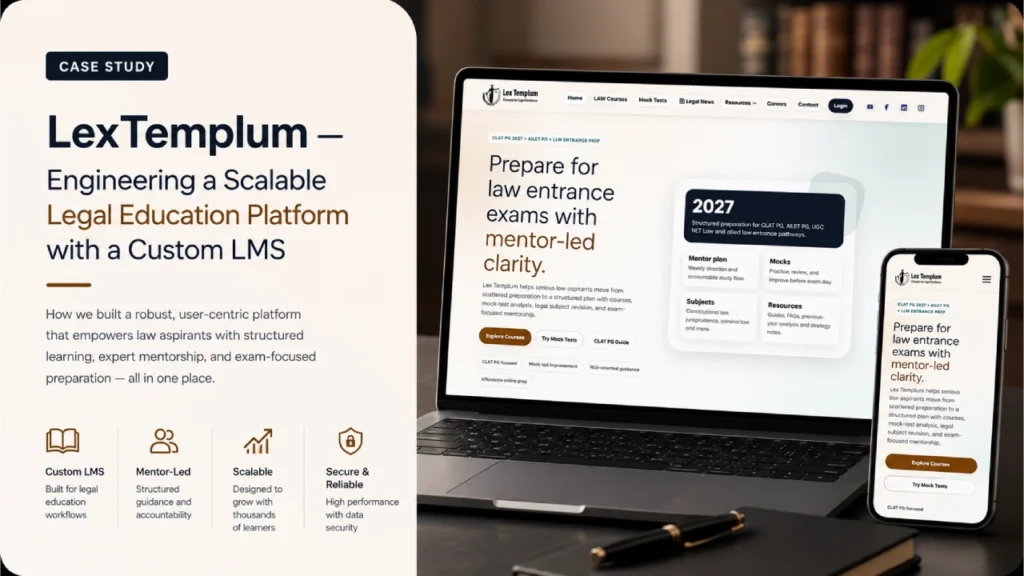
Start With the Right Kind of EdTech Product development
| Product type |
What it mainly does |
Typically suits |
Watch out for |
| LMS (learning management system) |
Manages courses, enrolments, content, grades, and reporting for an institution or organisation |
Schools, colleges, corporate training, compliance learning |
Heavy customisation of a standard LMS can cost more than it saves |
| Learning app |
A learner-facing product, often mobile-first, built around a specific experience such as test preparation, language learning, or skill practice |
EdTech startups and coaching brands with a defined audience |
Engagement features are easy to list and hard to design well |
| Virtual classroom platform |
Runs live sessions with video, chat, whiteboards, attendance, and recordings |
Live coaching, cohort programmes, tutoring marketplaces |
Video infrastructure drives cost and quality, so build versus integrate matters |
| Assessment system |
Creates, delivers, and evaluates quizzes and exams, with analytics |
Test preparation, certification, admissions, institutional exams |
Peak load, integrity, and result accuracy need careful engineering |
| Custom EdTech platform |
Combines the above around a specific model, workflow, or business logic |
Products or institutions whose model does not fit off-the-shelf tools |
Scope creep, because “everything in one platform” is a common failure |
EdTech Software Development data: Many real products combine several of these. A coaching centre may need a learning app, live classes, and tests, plus an administrative back office for fees and attendance. The useful question is which part of your model is genuinely different, and which parts are standard.
When Custom Development Makes Sense, and When It Does Not
Configuring or integrating existing tools is often more cost-effective when:
- Your needs are mainstream: course delivery, grading, and basic reporting.
- You are validating demand and speed matters more than differentiation.
- A mature LMS, a live-class tool, or a payment and invoicing service already covers most requirements.
- Your team can operate and maintain the configured system.
Custom development tends to be justified when:
- Your teaching or business model is the product, such as an unusual progression model, adaptive practice, or cohort mechanics.
- You need a specific learner experience that existing tools cannot deliver.
- You must combine data from several systems into one view for educators or administrators.
- Licensing, per-seat pricing, or platform limits would constrain your growth.
- Ownership of data, branding, and roadmap matters to your strategy.
A common middle path is a hybrid: keep a standard LMS or video tool for commodity functions and build custom components for what differentiates you, connected through standard interfaces. We assess this before recommending a build, because the cheapest software is sometimes software you do not have to write.
Learning Experience Decisions That Shape the Architecture
Each of the considerations below affects how the product feels to a learner or teacher, and each has an engineering and cost consequence. Not every one applies to every project. We discuss the ones that matter for yours.
Student Onboarding
The first session decides whether a learner continues. Onboarding must handle realistic situations: sign-up with a phone number or email, institution-provided accounts, parent-managed accounts for younger learners, bulk imports of students by an administrator, and joining a batch via invite code. Poor onboarding design leaves administrators creating accounts manually, which is where operational cost hides.
Course Management and Content Access
Content access rules shape both the user experience and the business model: paid versus free content, access tied to batch or enrolment dates, expiry, and region restrictions. These rules need to be enforced on the server, not just hidden in the interface, or paid content can be accessed by anyone with a direct link.
Learning Progress Tracking
Progress tracking should record meaningful events, such as lesson completion, practice attempts, and assessment results, in a structure that supports later analysis. Deciding early what you want to know, for example mastery by topic versus time spent, avoids retrofitting a data model once learners already have history.
Low-Bandwidth and Mobile-First Access
For many learners in India and other markets, the phone is the primary or only device, and connectivity varies. This affects design in concrete ways: lighter pages and images, video with adaptive bitrate so playback drops quality instead of stalling, resumable downloads, offline access for selected content, and graceful behaviour when a connection drops mid-quiz. Designing for the weakest realistic connection tends to improve the experience for everyone.
Accessibility
Accessibility is a usability requirement for learners with disabilities and a legal or procurement requirement for some institutions. It includes keyboard navigation, screen reader support, captions and transcripts for video, sufficient colour contrast, and adjustable text. Building to recognised guidelines such as WCAG from the start is considerably cheaper than retrofitting.
Student Data Privacy and Role-Based Permissions
Education platforms hold data about minors, performance, and sometimes payments. Different regulations may apply depending on where your learners are and who they are, for example India’s Digital Personal Data Protection Act, which has specific provisions for children’s data, FERPA and COPPA in the United States, and data protection law in the UAE. We design for data minimisation, parental consent flows where relevant, and clear retention rules, but legal obligations should be confirmed with your own advisors.
Role-based permissions follow from this. A student, a parent, a teacher, a batch coordinator, a branch administrator, and a super administrator need different access, and a teacher should see only their own batches. Permission rules belong in the backend, tested with realistic scenarios.
Video Delivery Costs and Content Protection
Video is often the largest recurring cost in an EdTech platform. Costs arise from storage, transcoding into multiple quality levels, and data delivery through a content delivery network. Practical decisions include using a managed video platform versus self-managed streaming, using adaptive streaming, setting sensible default quality for mobile, and caching. If you need to discourage unauthorised sharing, signed expiring URLs and watermarking help, although no technique makes content impossible to copy.
Live Classes and Concurrency
Live sessions raise a build-versus-integrate question. Integrating an established provider is usually faster and more reliable for standard classes. A custom classroom built on real-time communication technology gives control over experience and data but carries ongoing engineering and infrastructure cost, especially at scale or across poor networks. We usually recommend integration unless the classroom experience is central to your differentiation.
Examinations and Concurrent Load
Exams create sharp traffic spikes, since thousands of learners may start at the same minute. Architecture should account for this: capacity planning and load testing against realistic peaks, autosave of answers with local buffering and retry so a dropped connection does not lose work, queueing for result processing, and rate limiting to protect the system. On assessment integrity, proctoring approaches raise privacy and fairness trade-offs, and we discuss what is proportionate for your context instead of promising cheat-proof exams.
Integration With Existing Education Systems
Most institutions already run an LMS, a student information system, or a fee-management tool. Integrating through standard interfaces and single sign-on avoids duplicate accounts and manual reconciliation, and lets a new product coexist with existing systems rather than forcing a risky replacement.
Why Work With Cybertize Technologies
We are a software company, and our value in EdTech is engineering and delivery discipline across the whole product lifecycle. We do not claim past EdTech client outcomes or certifications on this page. What you can expect from an engagement:
- Requirements discovery. We work with founders, educators, and administrators to understand real workflows and constraints before proposing a solution, including what should be bought rather than built.
- UX/UI design. Interfaces designed for the actual users, such as students on phones and teachers managing large batches, with accessibility in view.
- Application architecture. Structures that fit your scale and roles, with access control, data model, and integrations planned up front.
- Development. Iterative delivery of web and mobile applications, with regular builds you can review.
- Integrations. Connection to LMS platforms, payments, video, identity, and administrative systems.
- Testing. Functional testing, device and network testing, and load testing for events such as exams and live classes.
- Deployment. Environments, release processes, and monitoring prepared with the launch calendar in mind, for instance admissions or exam season.
- Ongoing maintenance. Updates, fixes, and improvements after launch, which matter in a product that learners use daily.
As an EdTech software development agency, we aim to be a partner who tells you what not to build, which features to postpone, and where an existing tool is enough.
How an EdTech Project Typically Runs
- Discovery. Learners, educators, administrators, and business model. Outcome: shared scope, priorities, and a build-versus-integrate view.
- Product and UX design. User flows, wireframes, and prototypes for each role. Outcome: reviewed designs and a prioritised first release.
- Architecture and planning. Data model, permissions, integrations, video and live-class approach, and load assumptions. Outcome: an architecture outline and risk list.
- Development and integration. Iterative builds with regular demonstrations. Outcome: working releases in a test environment.
- Testing. Functional, device, network, accessibility, and load testing. Outcome: a release-ready build and known-issues list.
- Deployment and launch support. Production setup, monitoring, data import, and training for administrators and educators. Outcome: a controlled go-live.
- Maintenance and improvement. Monitoring, fixes, and new features driven by usage. Outcome: a product that keeps improving.
What to Consider Before You Invest
- Who is the primary user, and on what device? The answer shapes almost every design decision.
- What is genuinely different about your model? Build that, and buy or configure the rest.
- What are your peak moments? Exams, admissions, and live launches determine capacity needs.
- What data will you hold, and about whom? This determines privacy design and legal review.
- What will video cost at your expected usage? Estimate before choosing the architecture.
- What systems must it connect to? Integration scope is a frequent source of underestimated effort.
- Who will run it after launch? Administrators, content teams, and support need tools and training.
What Affects Cost
Cost depends on the number of user roles, the breadth of features, assessment complexity, video and live-class approach, integrations, security and privacy requirements, platforms supported (web, Android, iOS), and maintenance expectations. We do not publish prices. A discovery phase usually gives the most reliable basis for an estimate.
Talk Through Your EdTech Requirements
If you are planning an education product, replacing a system that no longer fits, or deciding whether to build or buy, the most useful first step is a conversation about your learners, your educators, and your constraints. Tell us what you are trying to teach or run, who uses it, and what it must connect to. We will explain what we would recommend, including when an existing tool is the better choice.
Request an EdTech Software Estimate →